The idea
Same story. Your character.
The Stones to Castle AI trend turns the line “They threw stones at me, so I built a castle” into a short visual story: a crowd throws stones, the lead picks one up, a castle rises, and the story ends at its window.
For the photo version, the aim is to replace that lead’s face and hair while keeping the sequence, setting and costumes. The video above shows the original reference beside our saved remake. The portrait below is the exact fictional character image used in that test.
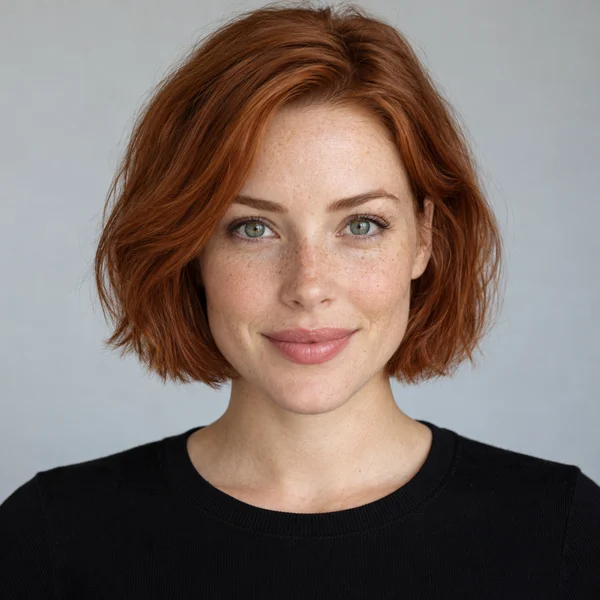
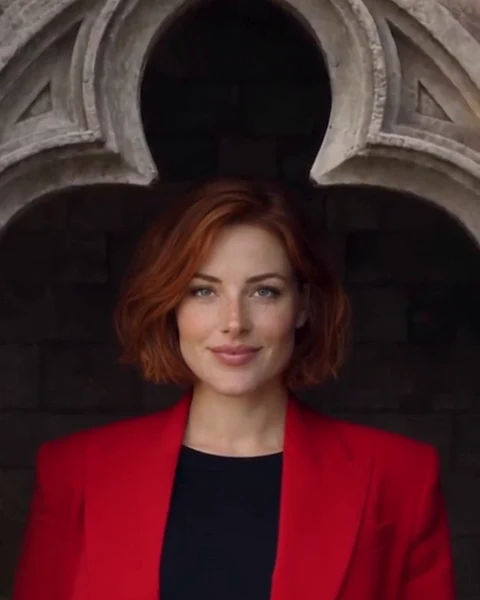
The remake follows the reference’s story, but AI can change framing and fine details. Use the comparison to judge likeness, motion and the ending—not just the first frame.
Original reel and concept: @bognina_anastasia_. The portrait and remake are our test materials. This independent site is not affiliated with the original creator.
Before you start
Give the model a clear face.
Choose a front-facing or slightly turned portrait of one adult. Keep the face and hair visible, with even light and enough space around the head. A sharp everyday photo is more useful than a heavily filtered one.
- Use a JPG, PNG or WebP under 10 MB.
- Avoid group photos, tiny faces, sunglasses and hands covering the face.
- Use your own photo, or a photo you have permission to use.
You do not need to wear the red suit in the photo. The reference supplies the story and outfit; the portrait supplies the character’s appearance. The example uses an AI-created adult portrait.
The walkthrough
From portrait to MP4.
Check the studio for current generation availability before purchasing. When generation is available, the flow is:
- 01
Upload your photo
Open the studio, keep the Photo tab selected, and choose your portrait. Check the preview, then confirm that you have permission to use the photo. Sign in with Google to keep the task in your account.
- 02
Make the character swap
Choose Buy one video if you need a video allowance. Review the checkout total, return to the studio and select Create my video. The story reference is already included; no prompt writing or separate reference upload is needed.
Follow the task through photo review, generation and completion in My videos. Reopen that task to check progress instead of submitting the photo again.
- 03
Preview, then download
Play the finished result in My videos. Check the lead in the opening and final close-up, then download the MP4 within seven days. Save a copy to your device before adding captions or music.
Before you share
Watch the whole story.
- The lead: does the face and hairstyle stay recognisable from the valley to the castle window?
- The motion: check hands, the picked-up stone and the transition into the castle.
- The background: the crowd should remain separate from the person in your photo.
The MP4 is silent. Add music using the licensed audio options in the platform where you plan to publish. Keep the original creator credit when discussing or showing the original trend.
A few useful details
Before you press create.
Is the demo the same resolution as the paid video?
The photo-replacement test shown here was generated at 480p and lasts about 15 seconds. The product is set up for an approximately 15-second, 9:16, 720p silent MP4. Enlarging the comparison video does not turn the underlying test into 720p.
How much does it cost?
The listed price is $9.90 for one video, with no subscription. Any applicable tax is shown at checkout. Check the studio’s availability before paying.
Will the face match perfectly?
Facial likeness is in beta and varies by photo. Start with a clear portrait, then inspect several moments in the output. The example shows one completed test with the portrait displayed on this page.
What happens if the task fails?
A failed task restores the video allowance. Check the existing task in My videos before starting another. Replaying or downloading a completed video does not charge again.
Put your photo in the story.
See the reference, choose a portrait and check current availability.
Open the photo studioDownload this comparison